Ask IQ
This section provides an overview of the Ask IQ feature and outlines best practices for using IQ to answer natural language questions.
Quick Access
To access your Ask IQ in the Trust3 Portal:
- Log in to the Trust3 Portal
- Navigate to Ask IQ from the main menu
From the Ask IQ page, you can select your desired IQ Space and ask questions.
Using Ask IQ
Ask IQ is a native chat like interface within the Trust3 AI platform that allows users to interact with the context engine using natural language interfaces.
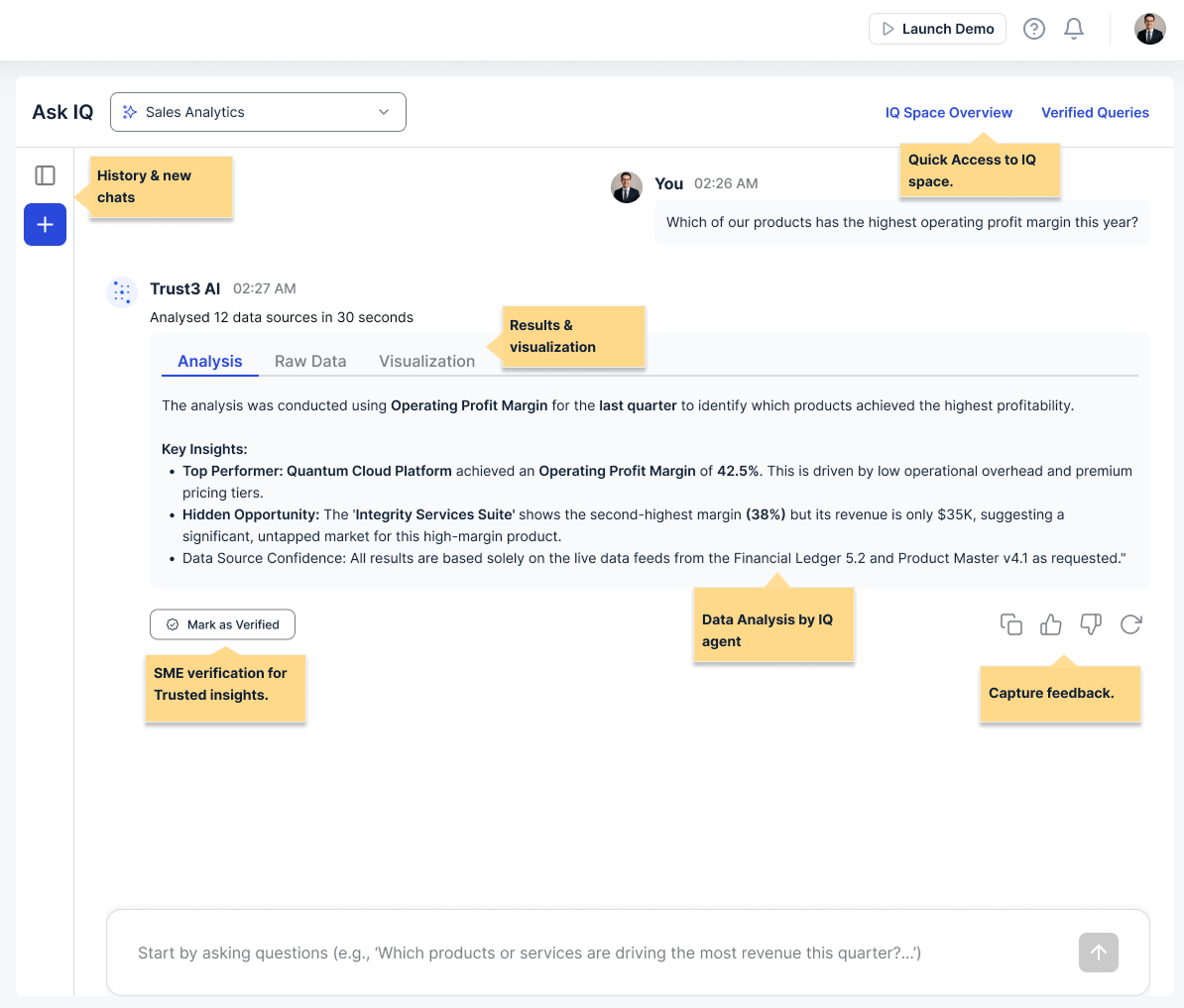
Ask questions
Users can interact with their data using natural language.
-
Analysis: After IQ processes a question, users receive a detailed analysis of the results. This analysis provides insights, trends, and explanations based on the question. The analysis helps users understand the data in context and provides actionable insights.
-
Raw Data: Users can switch to the Raw Data tab to view and copy results.
-
View SQL: Users can also view SQL from the Raw Data section just below the results.
-
Visualizations: When a user includes a clause for visualizations in the query, it will be rendered in this tab.
Validate Results and Provide Feedback
After reviewing the results, users can validate and provide feedback to improve IQ's performance:
-
Verified Queries: SMEs and domain experts can verify that the analysis addresses their question correctly and that the insights are relevant and accurate. After thoroughly comparing the raw data and the SQL query correctly retrieves the intended data, they can save these as "Verified Queries". Verified queries improve trust with end users, increasing adoption.
-
Provide Feedback: Users can use the feedback buttons to rate the response quality, report any issues or inaccuracies encountered, and suggest improvements for better results in future queries. IQ uses this feedback to continuously learn and evolve the IQ space context and semantics.
View IQ Space details
The IQ Space provides context about the data sources and context available to IQ. Access the IQ space overview to view the data sources, schemas and semantic sources that make up the space.
Access History
Users can access their query history to review and reuse previous questions:
-
View History: Users can access their complete conversation history with IQ, including all questions asked and their results. Users can navigate through previous sessions and queries.
-
Reuse Queries: Users can click on previous questions to re-run them, modify previous queries to ask related questions, or copy query text to use in new conversations.
-
Learn from Patterns: Users can review successful query patterns, identify which types of questions work best, and understand how to improve their question phrasing based on past results.
Basic Usage
Simple Questions
Users should start with simple, direct questions:
| Text Only | |
|---|---|
Comparison Queries
Users can compare different aspects of their data:
| Text Only | |
|---|---|
Question Patterns
Descriptive Questions
Questions that ask "what" or "show me": - "What are the current inventory levels?" - "Show me the most active users"
Quantitative Questions
Questions with numbers and calculations: - "How many orders were placed today?" - "What's the total revenue this year?"
Comparative Questions
Questions comparing different periods or groups: - "How does this month compare to last month?" - "What's the difference between product lines?"
Causal Questions
Questions about relationships: - "Why did sales drop this quarter?" - "What factors influence customer retention?"
Best Practices
Be Specific
✅ Good: "Show me sales revenue for Q3 2024 in the North region" ❌ Too Vague: "Show me revenue"
✅ Good: "Show me comparable accounts with respect to industry, region and company size to my account number ACCT-2355" ❌ Too Vague: "Show me comparable accouts to my account ACCT-2355"
Use Natural Language
✅ Good: "What are my top customers?" ❌ Too Technical: "SELECT customers ORDER BY revenue DESC LIMIT 10"
Leverage Context
✅ Good: "What are their contact details?" (referring to previously mentioned customers) ❌ Missing Context: "Their contact details"
Ask Progressive Questions
Users should start broad, then narrow down: 1. "What are our top products?" 2. "Show me the sales trends for those products" 3. "What's the forecast for next quarter?"
Advanced Techniques
Using Filters
Users can combine multiple criteria:
| Text Only | |
|---|---|
Temporal Queries
Time-based questions:
| Text Only | |
|---|---|
Aggregate Functions
Users can ask for summaries:
| Text Only | |
|---|---|
Tips for Better Results
-
Be Clear About Intent Clearly state what information is needed.
-
Specify Time Ranges When asking about time-sensitive data, users should specify the period.
-
Use Familiar Terms Use terminology that matches their business domain.
Not Seeing Expected Results
- Rephrase the question: Try different wording
- Be more specific: Add more context or details
- Break it down: Ask simpler, more focused questions
- Check data availability: Ensure relevant data sources are connected
Next Steps
-
Managing Context
-
Integration Options