Custom agents — monitoring
Monitoring means getting your agents' real activity into Trust3: which user asked what, which model answered, how many tokens it cost, how long it took. Once publishing your inventory has published your agents, monitoring attaches activity to them.
This half is configured in the Trust3 portal and needs one small change in your agent code. It is steps 3 and 4 of the set-up order: configure the collector, then instrument your agents. Steps 1 and 2 — the runtime plane and the published inventory — should already be done.
How traces reach Trust3
Your agent emits OTLP traces. Those traces are written to an S3 bucket, and the AI Assets Collector reads them back from there, processes them, and sends usage and monitoring information to the Trust3 portal.
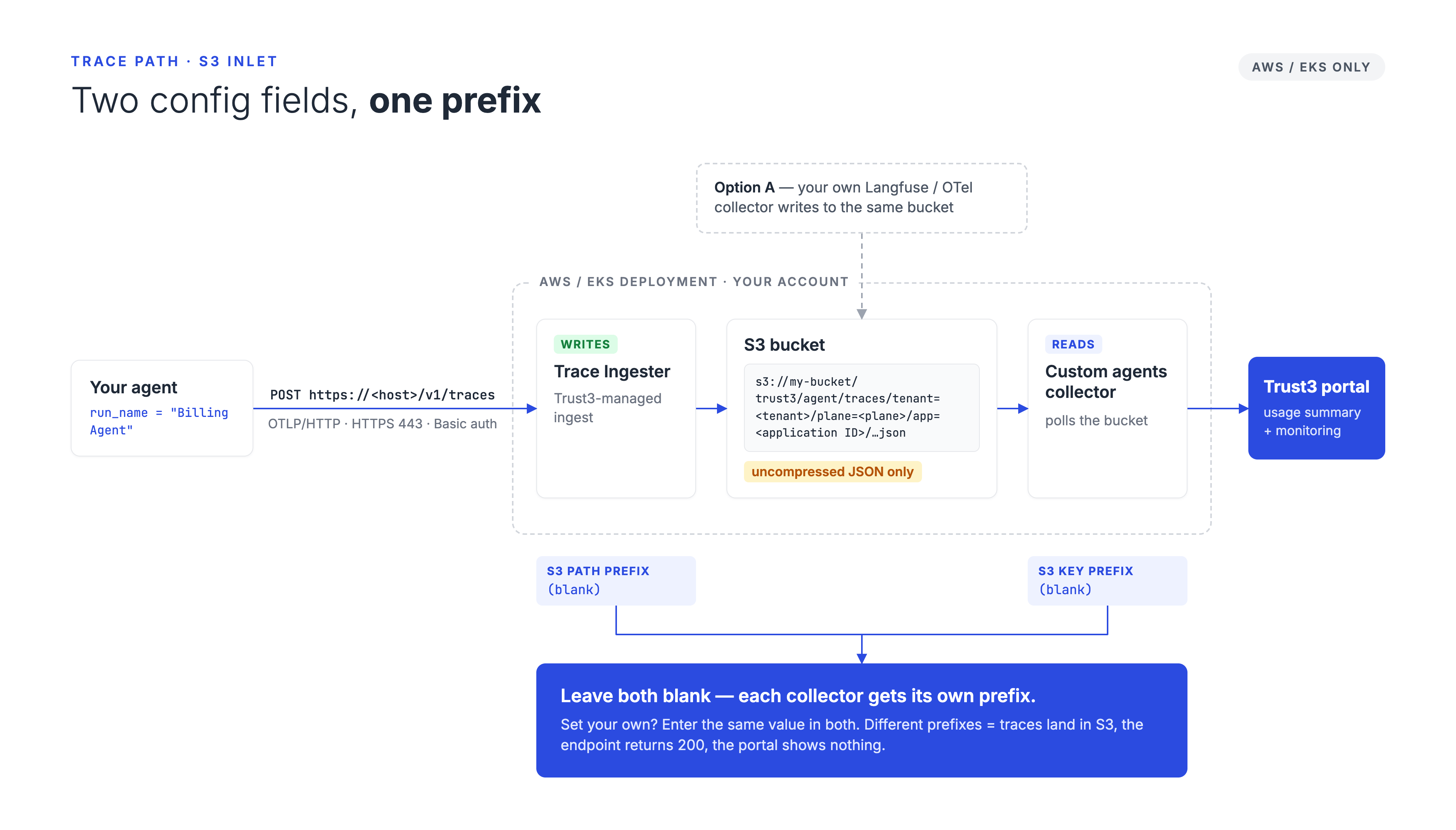
There are two ways to get traces into the bucket, and you only need one:
| How traces reach the bucket | Choose this if | |
|---|---|---|
| Option A | your agent → your own Langfuse / OTel collector → your S3 bucket → Trust3 collector | You already run an exporter that writes to S3 |
| Option B | your agent → Trust3's trace ingester → your S3 bucket → Trust3 collector | You want Trust3 to provide the receiving endpoint |
Option B is the common case, and the rest of this page assumes it unless stated otherwise. In Option B, Trust3 runs a trace ingester alongside the AI Assets Collector — in the same Kubernetes pod — and exposes an authenticated OTLP endpoint your agents push to.
The trace ingester is an OpenTelemetry collector, but it is not the OTEL collector
Under the hood the trace ingester is an OpenTelemetry collector. It is called the Trace Ingester in the configuration, and not "OTEL Collector", because every runtime plane namespace already contains an otel-collector service that handles Trust3's own platform telemetry. The two are unrelated: the trace ingester receives your agents' traces and writes them to your S3 bucket. Do not point your agents at the platform otel-collector.
Either way the destination is the same bucket, and the AI Assets Collector reads it back.
Uncompressed JSON only
The collector reads plain, uncompressed JSON trace files. Compressed objects are skipped silently, so gzip-exported traces are simply never seen.
Trust3's trace ingester writes uncompressed JSON by default, so with Option B there is nothing to configure. With Option A, check your exporter.
Before you begin
Monitoring depends on runtime plane settings that only Advanced Config exposes. Confirm all of these are in place before you start:
| Requirement | Where it is set |
|---|---|
| An AWS/EKS runtime plane | Create a runtime plane |
| AWS S3 Bucket Name | Storage Settings |
| EFS Storage ID | Persistent Storage |
| Domain Name and R53 Hosted Zone ID | DNS Management |
| AWS ACM ARN and ALB Subnet IDs | Ingress Settings |
IAM Role ARN with s3:* on the bucket | Cloud Permissions |
The full checklist, with the exact IAM statement, is at What custom agent monitoring needs.
Missing prerequisites fail quietly
The collector configuration will accept the trace ingester toggle even when the runtime plane is missing storage, DNS, or ingress. The deploy then succeeds — but no endpoint is created, and there is no error on the page. If you finish this page and no endpoint exists, this is the first thing to check.
AWS only
This path writes traces to S3 and is available on AWS/EKS runtime planes only. On an AKS or GKE plane the trace ingester fields are not offered at all.
Step 1 — Make your traces linkable
Do this before, or at the same time as, the configuration below. It is the step most often missed, and everything can be configured perfectly and still show nothing if it is wrong.
Traces are attached to assets by agent name, not by ID.
| What Trust3 reads | Where it comes from | Must match |
|---|---|---|
| Agent name | The name of the root span of the trace — in LangChain, the run_name you pass in config | The name of an AssetKind.AGENT in your published inventory |
| User | The user.id span attribute | A known identity, for per-user attribution |
So if you published an agent named Billing Agent, the root span of that agent's traces must also be named Billing Agent.
The rule is the same for a sub-agent. A delegated call is its own trace, so its root span must carry the sub-agent's name, exactly as the parent's root span carries the parent's. There is no metadata field that substitutes for the root span name.
agent_id does not rename a trace
The agent_id metadata field attributes token usage to a particular agent within a trace. It is not consulted when Trust3 decides which asset a trace belongs to — that is always the root span name. A trace whose root span is named LangGraph stays unlinked no matter what agent_id says.
If you do set it, the key is the bare field name: Langfuse prefixes metadata keys when it writes them as span attributes, so agent_id arrives as langfuse.trace.metadata.agent_id, which is what Trust3 reads. Passing the prefixed name as the key produces langfuse.trace.metadata.langfuse.trace.metadata.agent_id and is ignored.
Agent names must be unique
If a name matches more than one agent in your inventory, Trust3 treats the trace as unlinkable rather than guessing. A wrong link misattributes traffic, which is worse than no link.
Unlinked traces are buffered and retried for a few discovery cycles — roughly 45 minutes at the default 15-minute scan interval — then dropped. So a brief mismatch while you deploy the inventory is survivable; a permanent one loses data.
Give every trace a root span with something inside it
On release 9.2.39.2 and earlier, traces made of a single span can stop the collector reading your S3 prefix. The scan then reports no new traces: nothing appears in the portal, and nothing in your application fails or logs an error. A fix ships in the next release.
Agents and graphs are unaffected — they always produce a span per step. It is a bare model call, traced with nothing around it, that produces a lone span. Open a root span named after the agent and make the call inside it:
| Python | |
|---|---|
This is the shape Trust3 expects in any case — the root span is the agent, its model and tool calls sit beneath it — so it stays correct after the fix. The Direct LLM call snippet is a complete example.
Step 2 — Configure the collector
Create or open the collector
Custom agents get a collector of their own, created from the Custom agents tile.
- Go to Settings → Runtime and click your runtime plane.
- Open the Collectors tab.
- Click Add New and choose the Custom agents tile — or open an existing Custom agents collector to edit it.
- On the BASIC INFO tab, give the collector a name and description. The name defaults to
custom-agents. Deployment Mode shows Dedicated and cannot be changed: a Custom agents collector always runs in its own pod. It takes no Databricks workspace or Microsoft tenant; add a connection for those. - Switch to the AI_ASSETS_COLLECTOR tab.
The collector name becomes part of your endpoint hostname
Pick something short and stable. The trace endpoint hostname is built from it, so renaming the collector changes the URL your agents push to.
The hostname starts with <collector name>-<runtime plane name>, and that part must stay within 63 characters. The default name fits every runtime plane name. A longer name is refused when you save with the trace ingester on ("The trace ingester's address would start with …"), and the message says how long the name can be on this runtime plane.
The tab holds three collapsible sections:
- Custom Agents — where the collector reads trace files from. Always needed.
- Trace Ingester — the endpoint your agents push traces to. Option B only. Shown on AWS/EKS runtime planes only.
- Monitoring — trace classification, covered in Step 3.
You can add several Custom agents collectors to one runtime plane — for example, one per team. Each runs its own pod and, with the default prefixes, reads and writes its own traces.
Custom agents and the other collector tiles
The Databricks and Microsoft connection tiles, and the shared hosts they run on, have no Custom Agents or Trace Ingester section. Custom agents are configured only on a Custom agents collector.
A collector created from the AI Assets Collector (Legacy) tile — including every collector created before the Custom agents tile existed — keeps both sections and keeps working as before. See On a Legacy collector.
Runtime plane release
The Custom agents tile needs a runtime plane on release 9.2.45.3 or later. On an older runtime plane, use the AI Assets Collector (Legacy) tile.
Section: Trace Ingester (Option B only)
This section configures the trace ingester that receives your agents' traces and writes them to S3. Skip this whole section if you are using Option A and already export to S3 yourself.
Expand Trace Ingester and fill in:
| Field | What to enter |
|---|---|
| Enable trace ingester | Turn on. This creates the authenticated OTLP endpoint. Turning it off later removes the endpoint. |
| S3 bucket name | The bucket that receives the traces. Defaults to the AWS S3 Bucket Name set on the runtime plane; change it only to send this collector's traces elsewhere. |
| S3 path prefix | Leave blank to use this collector's own default prefix — see The write prefix and the read prefix. |
| Trace ingester username | The Basic Auth username your agents will send. Defaults to trust3agent. |
| Trace ingester password | The Basic Auth password your agents will send. You choose this value. |
If you override the bucket, check the IAM role
The runtime plane's IAM policy is generated from the plane-level bucket name. A different bucket here is, by construction, outside that policy until someone adds it — so grant the plane's IAM role access to the new bucket as well.
On an AWS Secrets Manager plane, the password field takes a key name
If the runtime plane's secret store is AWS Secrets Manager, enter the key name inside that secret, not the password itself — on that store type anything typed directly into the form would be readable by anyone who can view this collector's configuration.
Changing the password restarts the pod. Traces still buffered in memory at that moment are lost: agents that retry recover, agents that fire and forget do not.
Section: Custom Agents
This section is the read side: it tells the AI Assets Collector where to find trace files. It is required for both Option A and Option B.
Expand Custom Agents and fill in:
| Field | What to enter |
|---|---|
| Enable Langfuse / OTEL Trace Monitoring | Turn on. |
| S3 Bucket Name | The bucket holding the trace files. Defaults to the runtime plane's bucket. |
| S3 Key Prefix | The prefix the trace files are written under. With Option B, leave blank — see below. |
| S3 region | The AWS region of the bucket. Defaults to us-east-1. |
The collector reads the bucket using the runtime plane's IAM role. There are no access-key fields in this form.
The write prefix and the read prefix
The S3 path prefix in Trace Ingester (write) and the S3 Key Prefix in Custom Agents (read) are two halves of one pipeline. The collector only sees traces written under the prefix it reads.
Option B — leave both blank. This is the simplest setup:
- The trace ingester writes under this collector's own prefix:
trust3/agent/traces/tenant=<tenant>/plane=<plane>/app=<application ID> - When S3 Key Prefix is blank, the trace ingester is on, and both sections use the same bucket, the collector reads exactly that prefix.
- You do not need to know the application ID.
Option B — set your own prefix. Enter the same value in both fields.
Option A — no trace ingester. Set S3 Key Prefix to the prefix your own exporter writes under. Left blank, the collector scans the whole bucket.
A mismatch fails silently
If the read prefix does not match where traces are written, traces land in S3 correctly, the endpoint returns success, and nothing ever appears in the portal.
The diagram at the top of this page shows both fields and the single string they have to share.
Keep each collector's prefix its own
With the defaults, several Custom agents collectors — on one runtime plane or several — never share a prefix. If you set your own prefixes, give each collector a different one.
Trust3 does not compare collectors. Two collectors pointed at the same bucket and the same S3 Key Prefix both collect every trace, so each trace arrives twice.
On a Legacy collector
A collector created from the AI Assets Collector (Legacy) tile behaves as before:
- A blank S3 path prefix writes under the plane-wide prefix
trust3/agent/traces/tenant=<tenant>/plane=<plane>, with no/app=part. - A blank S3 Key Prefix scans the whole bucket.
Set both fields explicitly to the same value. If several runtime planes write to the same bucket, give each one a distinct prefix, or their traces are mixed together under one path.
Save
Click Save. The collector redeploys with the new configuration.
Step 3 — (Optional) Turn on trace classification
Classification asks an LLM to categorise each collected trace, which is what produces category signals and off-topic verdicts.
Expand the Monitoring section:
| Field | What to enter |
|---|---|
| Enable trace classification | Turn on. Applies to every monitoring provider, not just custom agents. |
| Classifier LLM provider | anthropic or openai. |
| Classifier LLM model | The model name for that provider — for example claude-haiku-4-5 for Anthropic, gpt-4o-mini for OpenAI. |
| Classifier LLM API key | Your own API key for that provider. |
All three fields are required once the toggle is on. If any is missing, the collector logs a warning and leaves traces unclassified rather than failing to start.
Off-topic flagging needs three things
Classification on its own does not flag anything. You also need categories declared on the agent via provenance_json and an active Off Topic policy — a Runtime rule on a Cost Governance policy. See Policies.
Step 4 — Find your trace endpoint
Once the collector has deployed, Trust3 creates a Kubernetes Ingress for the OTLP endpoint in the runtime plane's namespace. Read the hostname from the cluster with kubectl.
List the ingresses in your runtime plane's namespace — the namespace is the runtime plane name:
| Bash | |
|---|---|
You are looking for the one whose name starts with your collector's name. For example, for a collector named support-agents on runtime plane aws-us-east-1-809:
A collector created before release 9.2.45.3 keeps -aias after its name, in both the ingress name and the hostname: support-agents-aias-ingress, support-agents-aias-aws-us-east-1-809.dev.example.com.
To print just the hostname:
| Bash | |
|---|---|
Your OTLP endpoint is that hostname over HTTPS, with the standard OTLP traces path:
| Text Only | |
|---|---|
The hostname follows a predictable pattern, so you can sanity-check what kubectl returns:
| Part | Value |
|---|---|
<collector-name> | the name you gave this collector on the BASIC INFO tab. A collector created before release 9.2.45.3 adds -aias |
<runtime-name> | your runtime plane name, which is also its Kubernetes namespace |
.<your-domain> | the Domain Name / R53 Hosted Zone Name from the runtime plane's Storage & Connectivity step |
Read it from the cluster rather than assembling it
The pattern is there to sanity-check the kubectl output, not to replace it. The collector name is yours, so the hostname is only as predictable as your naming.
OTLP over HTTP only — there is no gRPC listener
The endpoint is exposed through the load balancer as OTLP/HTTP on port 443. Point your exporter at the HTTPS URL. There is no gRPC (:4317) endpoint to connect to.
Whether the endpoint is reachable from outside your VPC is your choice
The endpoint is served by an ALB whose scheme comes from the subnets you chose in Ingress Settings. With internal subnets it is reachable only from inside your VPC or a peered network — which means your agent application has to run there too. Choose according to where your agents run.
Check you can reach it
| Bash | |
|---|---|
A 2xx means the endpoint is up and your credentials are accepted. A 401 means the username or password is wrong. No response at all usually means DNS has not propagated yet, or the endpoint was never created because a runtime plane prerequisite is missing.
Step 5 — Instrument your agent
Any OpenTelemetry SDK works. For LangChain or LangGraph the shortest path is to use Langfuse purely as the instrumentation layer — the piece that knows how to turn a LangChain run into spans.
No Langfuse account or server is needed
The placeholder keys below never leave your process, and should_export_span is set to always return False, so Langfuse instruments but never exports. Your Trust3 endpoint is the only destination.
Install everything the snippets import:
| Bash | |
|---|---|
Export your settings
Every snippet reads its configuration from the environment, so nothing has to be edited inside the file. Export these in the shell you run them from:
| Variable | Where it comes from |
|---|---|
TRUST3_API_KEY | The runtime plane's x-pcloud-key, from the Deploy step |
TRUST3_TRACE_ENDPOINT | Step 4 — find your trace endpoint |
TRUST3_TRACE_USERNAME / TRUST3_TRACE_PASSWORD | What you set in the Trace Ingester section |
OPENAI_API_KEY | Your OpenAI account. This is neither the trace ingester password nor the Trust3 API key. |
The TRUST3_* names are this page's convention, not the SDK's
The SDK never reads environment variables itself — the snippets read these and pass api_key to InventoryClientConfig explicitly. Use whatever names your application already uses for configuration.
Which snippet to use
Pick the one that matches your code. Each tab is a complete, runnable file: it publishes its own agent to the inventory, then sends a trace that links to it. Export the variables above and run it — nothing to edit inside.
| Your code | Tab | Agent it publishes |
|---|---|---|
| You just want to prove the whole path works | Smoke test | Expense Report Auditor |
| An agent or a LangGraph graph — the normal case | Agent or graph | Loan Application Reviewer, with a Credit Bureau Lookup sub-agent |
| A direct model call, with no agent or graph | Direct LLM call | Support Ticket Summarizer |
Each publishes a different agent name, so you can run all three against one runtime plane and tell their activity apart in the portal.
The inventory half here is deliberately minimal
These scripts publish just enough for the trace to have something to attach to. Snapshots are full, idempotent pushes and belong in your application's startup path — see Publish inventory for what to publish, when to run it, and how to handle errors.
The shortest end-to-end check: one agent published, one call traced. Run this first — if its activity shows up in the portal, your endpoint, credentials and inventory are all good.
| Python | |
|---|---|
1 2 3 4 5 6 7 8 9 10 11 12 13 14 15 16 17 18 19 20 21 22 23 24 25 26 27 28 29 30 31 32 33 34 35 36 37 38 39 40 41 42 43 44 45 46 47 48 49 50 51 52 53 54 55 56 57 58 59 60 61 62 63 64 65 66 67 68 69 70 71 72 73 74 75 76 77 78 79 80 81 82 83 84 85 86 87 88 89 90 91 92 93 94 95 96 97 98 99 100 101 102 103 104 105 106 107 108 109 110 111 112 113 114 115 116 117 118 119 120 121 122 123 124 125 126 127 128 129 130 131 132 133 134 135 136 137 138 139 140 141 142 143 | |
The normal case. Builds a minimal LangGraph graph so the file runs as-is; swap in your own compiled graph and the rest is unchanged.
| Python | |
|---|---|
1 2 3 4 5 6 7 8 9 10 11 12 13 14 15 16 17 18 19 20 21 22 23 24 25 26 27 28 29 30 31 32 33 34 35 36 37 38 39 40 41 42 43 44 45 46 47 48 49 50 51 52 53 54 55 56 57 58 59 60 61 62 63 64 65 66 67 68 69 70 71 72 73 74 75 76 77 78 79 80 81 82 83 84 85 86 87 88 89 90 91 92 93 94 95 96 97 98 99 100 101 102 103 104 105 106 107 108 109 110 111 112 113 114 115 116 117 118 119 120 121 122 123 124 125 126 127 128 129 130 131 132 133 134 135 136 137 138 139 140 141 142 143 144 145 146 147 148 149 150 151 152 153 154 155 156 157 158 159 160 161 162 163 164 165 166 167 168 169 170 171 172 173 174 175 176 177 178 179 180 181 182 183 184 185 186 187 188 189 190 191 192 193 194 195 196 197 | |
Put config on the outermost call
If you attach it to an inner chain instead, the root span takes that chain's name and the trace will not match your agent.
Code that calls a model directly, with no agent or graph, and still needs governing.
| Python | |
|---|---|
1 2 3 4 5 6 7 8 9 10 11 12 13 14 15 16 17 18 19 20 21 22 23 24 25 26 27 28 29 30 31 32 33 34 35 36 37 38 39 40 41 42 43 44 45 46 47 48 49 50 51 52 53 54 55 56 57 58 59 60 61 62 63 64 65 66 67 68 69 70 71 72 73 74 75 76 77 78 79 80 81 82 83 84 85 86 87 88 89 90 91 92 93 94 95 96 97 98 99 100 101 102 103 104 105 106 107 108 109 110 111 112 113 114 115 116 117 118 119 120 121 122 123 124 125 126 127 128 129 130 131 132 133 134 135 136 137 138 139 140 141 142 143 144 | |
Two things decide whether this reaches Trust3:
- The wrapping span is what links it. It is the root of the trace, and the root span name is what Trust3 matches against your inventory, so it has to equal the
nameof the asset the script publishes. run_namenames the model call inside that trace. Without it the inner span takes the class name,ChatOpenAI— only a readability loss here. But drop the wrapping span and that inner span becomes the root, which is the case Step 1 warns about.
A tracing problem never reaches the caller
If the endpoint is unreachable the LLM call still succeeds, and only export errors are logged. Equally, with no callbacks entry there is no span at all — the callback is the only thing making a call traced, so it is the first thing to check when nothing arrives.
What a successful run looks like
Each script prints its progress, so you can tell where it got to:
Failures stop the script with a line naming the cause rather than a traceback:
| Message | Meaning |
|---|---|
FAILED: TRUST3_API_KEY is not set. … | A variable from Export your settings is missing or blank |
FAILED: governance rejected the inventory (HTTP 401): … | The API key is wrong — it must be the runtime plane's x-pcloud-key |
FAILED: governance rejected the inventory (HTTP 422): … | The snapshot was malformed; the message names the offending field |
FAILED: could not reach https://… after retries: … | Wrong API host, or no network path to it |
[done] means the script ran, not that the trace arrived
The inventory push is confirmed — governance=200 is the real response. Trace export is not: it happens in a background batch, and the OpenTelemetry SDK logs export failures rather than raising them, so a bad endpoint or password shows up as an error line above the [done] banner while the script still exits 0. Read the output, and confirm in the portal.
Moving it into a real application
The snippets are single files so that they run as-is. In an application, split them three ways:
- The inventory push runs on startup, once your agent registry is built. It is a full, idempotent push, so re-sending it is safe — see Publish inventory, which also covers making it non-fatal so governance being unreachable cannot stop your app booting.
- Tracing setup runs once, at startup — everything from the
tokenline to theLangfuse(...)call. Do not repeat it per request. provider.shutdown()goes in your exit hook, not after each request. Spans are batched, so a process that exits without it loses whatever is still buffered — but calling it per request tears down tracing after the first one.
The env() helper and the [1/3] progress lines are there to make a one-off run legible; in an application these become your normal configuration loading and logging.
What a trace contains
Worth knowing before you enable this, especially if you are reviewing it for compliance. Each recorded event carries:
- the agent name and session id
- the user, from the
user.idattribute - a prompt preview and a response preview — the first 500 characters of each, truncated
- token counts, latency, and status
So prompt and response text is included, in truncated form.
It goes only to your own S3 bucket. The trace ingester has exactly one destination configured, with no Trust3 Cloud exporter in that pipeline at all — a structural property rather than a setting that could be misconfigured. The AI Assets Collector then reads those files and sends usage and monitoring summaries to the portal.
Verify
- Send some traffic through your agent.
-
Check S3. Objects should appear under your bucket and prefix:
Bash -
Wait one scan interval. The collector runs its pipeline every 15 minutes by default — the Scanner interval (minutes) field in the General section.
- Open the agent in the portal. Go to AI Assets, open the agent, and look at its activity. A correctly linked trace shows the session, the user, the prompt and response previews, and token counts.
If the agent row exists but its activity stays empty past two intervals, linking is failing — start with Step 1.
Troubleshooting
Arranged from most to least common — work down the list.
Assets appear, but no activity against them
Almost always the name-matching rule in Step 1. Check that the root span name of your traces exactly matches the agent name you published, and that no two agents share a name.
The two most common causes, in order:
- The root span carries a framework default instead of your agent's name. A LangGraph run with no
run_nameis calledLangGraph; a bare model call with norun_nametakes its class name, such asChatOpenAI. Neither can match an asset. Passrun_nameon the outermost invocation, so it names the root of the whole run. - The two names differ by a character. The match is exact —
Ticket Summariserdoes not matchTicket Summarizer, and neither spelling, spacing nor case is normalised. Publishing and tracing from a single constant, as the snippets above do, removes this failure mode entirely; two hand-typed strings drift.
Nothing is ingested at all, and the collector log shows a Binder Error
On release 9.2.39.2 and earlier, if the trace files in your prefix contain only single-span traces, the collector cannot determine their schema and the whole read fails. The log records it once as an error and then reports the cycle as empty:
| Text Only | |
|---|---|
Because the cycle reports records=0, this looks identical to having no new traces. A fix ships in the next release.
Until then, make sure your traces have a root span with at least one span inside it — see Step 1. Once any multi-span trace exists in the prefix, the reads succeed, and single-span traces written from then on are picked up normally.
Each scan re-reads the previous 15 minutes and discards traces it has already seen, so a single failed scan usually loses nothing. What does not come back is anything that fell outside that lookback while the reads were still failing.
Objects are landing in S3, but Trust3 shows nothing
The Custom Agents section is not pointed at the same bucket and prefix the trace ingester writes to. This is the single most common configuration mistake — see the prefix rules.
Also confirm the files are uncompressed JSON. Compressed objects are skipped silently.
No endpoint exists at all
A runtime plane prerequisite is missing — storage, DNS, ingress, or the IAM role. The toggle saves without them and Runtime Manager removes the feature at deploy time. Check the checklist, then look for a warning in Runtime Manager's log naming the missing piece.
401 Unauthorized
The username or password is wrong. Two specific causes:
- On an AWS Secrets Manager plane, the password field must hold the key name, not the password.
- Both the username and the password must be present. A half-configured pair is treated as no credentials at all — most SDK wrappers log a warning and then export with no
Authorizationheader, which the endpoint rejects.
The endpoint returns success, but nothing lands in S3
The runtime plane's IAM role cannot write to the bucket, or the bucket is in a different region from the runtime plane. Check that the role has s3:* on both arn:aws:s3:::<bucket> and arn:aws:s3:::<bucket>/*.
Cannot reach the endpoint from your application
Check whether the ALB is internal. If it is, your agent has to run inside the VPC or a peered network. Confirm DNS resolves the hostname from wherever your agent runs:
| Bash | |
|---|---|
Spans never leave a short-lived process
Span export is batched. A script or job that exits without calling provider.shutdown() — or the equivalent flush for your SDK — drops whatever is still buffered.
Large exports fail while small ones succeed
The endpoint caps request size. Lower max_export_batch_size on your BatchSpanProcessor so each export carries fewer spans.
Traces are collected but uncategorized
Trace classification is off, or its provider, model, or API key is missing — see Step 3. The collector logs a warning and leaves traces unclassified rather than failing.
Classification is on but no off-topic verdict
All three requirements must hold: the agent declares categories, classification is on, and an active Off Topic policy covers its asset type. Check the category spelling too — matching is exact.