Monitoring custom agents
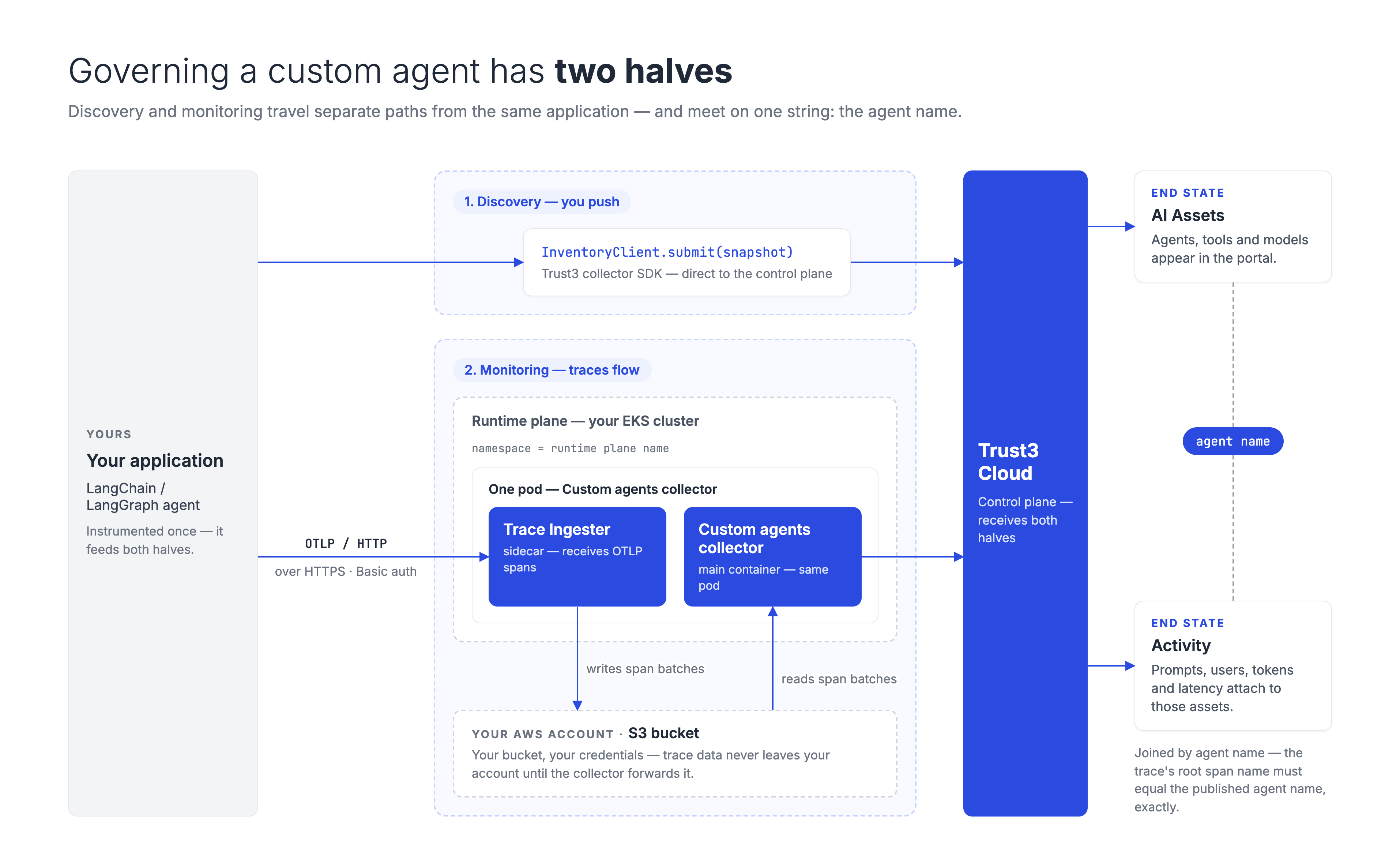
Use these pages for agents you build yourself — LangChain, LangGraph, or any custom framework — rather than agents hosted on a managed platform such as Databricks or Azure AI Foundry. A custom agent is code, not a registered cloud resource, so there is nothing for a collector to enumerate: you publish your agents from your own application, and their traces reach Trust3 separately. That is why the collector's Custom Agents section has a trace monitoring switch but no discovery switch.
Governing one has two halves, and you need both. Discovery tells Trust3 which agents exist; monitoring brings their activity in. Without discovery, traces arrive with no asset to attach to; without monitoring, you get an inventory that never shows any activity.
Set up in this order
Each step needs something the previous one produces, so start at the top. Each link opens in a new tab, so this list stays put while you work through it.
| Step | What you do | Why it comes first |
|---|---|---|
| 1 | Create a runtime plane using Advanced Config | Generates the API key step 2 needs, and the storage, DNS, ingress and IAM role step 3 needs |
| 2 | Publish your inventory with the collector SDK | Your agents have to exist in Trust3 before a trace can attach to one |
| 3 | Add a Custom agents collector on that runtime plane | Creates the authenticated trace endpoint, and tells the collector where to read traces from |
| 4 | Instrument your agents to push traces to that endpoint | Needs the endpoint hostname and the credentials from step 3 |
Step 1 comes first, whichever half you want
The SDK needs an API key, and that key is generated while you create the runtime plane — shown once, on the last step of the wizard. Starting at step 2 means going back for it, and recovering it later means regenerating the key and redeploying the runtime agent.
Steps 2 and 4 are changes to your application code; steps 1 and 3 are portal and cluster tasks, so they are often done by different people. The order still holds.
Monitoring — steps 3 and 4 — needs an AWS/EKS runtime plane, because it writes traces to S3. Publishing an inventory has no such restriction and works from anywhere your application runs.
Only want your agents listed in the inventory?
Then this page is more than you need. Advanced Config above is required because steps 3 and 4 collect traces; publishing an inventory needs nothing from it but the API key, which Basic Config also produces in three steps. Go straight to Publish inventory with the Python SDK and add monitoring later if you want it.
The rule that catches people out
Traces are matched to assets by agent name, not by ID. The name of a trace's root span must exactly equal the name of an agent you published with the SDK, and no two agents may share a name. A trace that does not match is collected but never linked, so the agent shows up in the portal with no activity against it.
Decide your agent names before you write either half. The full rules — the sub-agent case, and how long unlinked traces are retried for — are in Monitoring → step 1.
Terms used on these pages
- SDK — Software Development Kit. The Python package you add to your own application to publish your agents to Trust3.
- OTLP — OpenTelemetry Protocol. The standard format your agents emit activity in.
- Span — one recorded step: a single model call, or a single tool call.
- Trace — the tree of spans for one request. The root span is the outermost one, and its name is what Trust3 matches against your agent.
- Runtime plane — the Kubernetes deployment in your own cloud account where Trust3 runs the collector. See Create a runtime plane.
- Trace ingester — a component Trust3 can run for you alongside the AI Assets Collector. It accepts OTLP traces from your agents over an authenticated endpoint and writes them to your S3 bucket. It is an OpenTelemetry collector internally, but it is named Trace Ingester to keep it distinct from the
otel-collectorservice that carries Trust3's own platform telemetry in every runtime plane namespace.